For years, smartphone brands have pushed bigger phones and saved their best camera systems for the “Pro” or “Ultra” models. If you wanted a compact device, you usually had to accept weaker cameras and features that felt watered down. That’s why the Vivo X300 stands out. It takes that old small-screen compromise and flips it on its head.
This vivo x300 review walks through what makes this phone different, following the same tone and feel of the original hands-on impressions.
Design
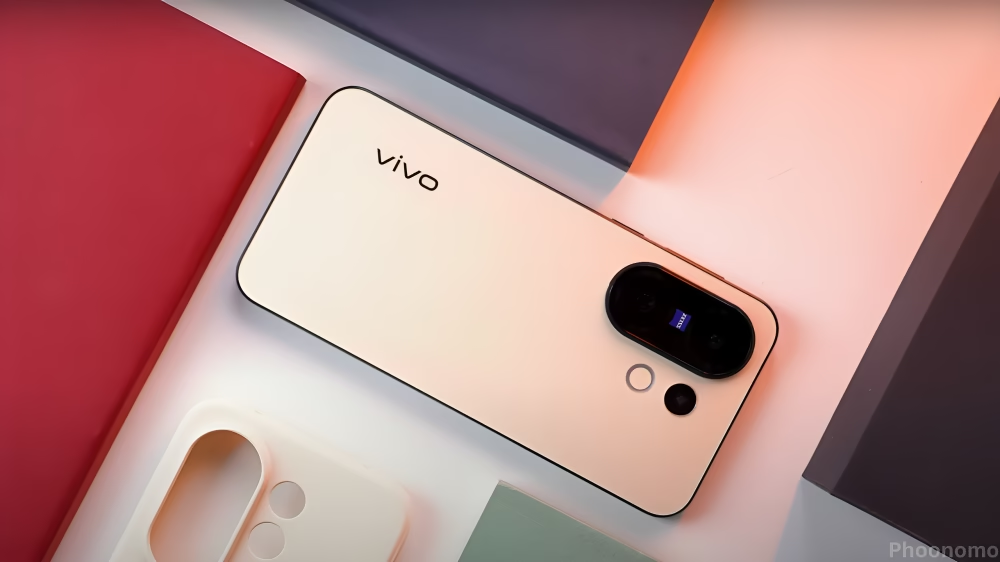
The first thing you notice is how easy the X300 is to hold. It has a 6.3-inch body and weighs about 183g, which makes it ideal for anyone tired of carrying a heavy slab. What’s surprising is that this compact phone still brings real flagship hardware, especially in the camera department.
It comes in four colorsblack, blue, purple, and pink. All of them use a matte AG glass back that resists fingerprints well and reflects subtle shimmer patterns depending on the angle. The look is simple but classy, not loud but definitely premium.
| Feature | Vivo X300 |
|---|---|
| Body Size | 6.3-inch compact design |
| Weight | 183g |
| Build | Matte AG glass back |
| Colors | Black, Blue, Purple, Pink |
| One-Hand Use | Yes, very comfortable |
Display
The 6.3-inch display isn’t huge, but Vivo made smart tweaks. There’s an AI adaptive color temperature mode that adjusts based on your surroundings. At night it cuts down blue light to reduce eye strain. It is also certified for low blue light, which helps during long scrolling or reading.
The in-display fingerprint scanner unlocks in about 0.2 seconds and still works if your hands are wet. There’s also a one-hand mode where the screen shrinks toward the bottom so you can reach everything easily.
| Feature | Vivo X300 |
|---|---|
| Screen Size | 6.3 inches |
| Type | OLED |
| Refresh Rate | 120Hz |
| Eye Protection | AI adaptive color temperature |
| Extra Features | TUV low blue light certification, One-hand small screen mode |
Software
The international model runs OriginOS 6 built on top of Android 16. The whole experience feels built around smoothness and personalization. During testing, the phone didn’t struggle even when several apps were open in the background. Gaming stayed stable, the UI animations looked polished, and app switching felt instantly responsive.
One feature that stood out is Drag and Go. It sounds small, but it saves time. If you’re booking a hotel and want to open directions right away, you drag the address to navigation. Need to save the checkout time? Drag it straight to Notes. It removes the extra steps people usually go through.
The system also brings AI features into daily uselive meeting captions, commuting suggestions for drivers, and small quality-of-life upgrades that don’t feel gimmicky. There’s also real-time translation for over 30 languages such as English, French, and Spanish. And because this is the global version, everything works fine with Google apps, including Google Play and Maps.
Another useful detail is notification stacking. If the same app sends multiple alerts, they stack automatically so your lock screen doesn’t turn into clutter.
| Feature | Vivo X300 |
|---|---|
| Operating System | OriginOS 6 (Android 16) |
| Key Features | Smooth UI, optimized animations |
| AI Features | Meeting captions, commuting assistant |
| Special Function | Drag and Go shortcut system |
| Google Support | Full support (Play Store, Maps, etc.) |
| Translation | Real-time translation in 30+ languages |
Camera
The main 200MP sensor uses Vivo’s custom HPB sensorthe same core hardware that helped the Pro model gain popularity among photography fans. The photos look sharp whether it’s daytime or low light. Shadows are handled well, highlights don’t blow out easily, and colors stay consistent.
The ultra-wide camera is solid too. Sample photos show good edge correction and color matching.
For portraits, the X300 keeps the same focal lengths as the X200 series23mm, 35mm, 50mm, 85mm, and 100mm. Vivo’s portrait style isn’t trying to be hyper-realistic. It leans toward making people look good. Skin gets softened slightly and blemishes fade. Some people like this approach; others want natural detail. It depends on personal taste, but the results are pleasing.
The phone can shoot 4K 120fps LOG video and up to 2.8K 60fps with stabilization. For creators, the “shoot first, crop later” feature helps capture moments without stressing about framing. There’s also a video-to-live-photo option for quick social sharing.
One feature that really stands out is the AI portrait eraser. It looks more natural than many other similar tools. You can remove or move people in a photo, and the background blends surprisingly well.
Now we get to one of the biggest changes. Most small-screen phones skip a strong telephoto lens. The X300 doesn’t. It comes with a 50MP telephoto lens with CIPA 4.5 professional-level stabilization, and the results are impressive.
During testing, shots of plants, roof tiles, building carvings, and even distant skyscrapers came out with strong detail. This is not the usual downgraded camera you’d expect from a standard model.
But it’s not perfect. When shooting at the 223mm focal length, the AI sharpness algorithm sometimes pushes too far. In places with low light or cloudy weather, the software tries to boost clarity but ends up adding smeared textures. For some objects, the images can look like they were processed too heavily. This happens mostly with very fine details or indoor lights.
Still, judging the standard version by Pro-level standards might be unfair. For a compact flagship, the telephoto performance is far better than expected.
| Feature | Vivo X300 |
|---|---|
| Main Camera | 200MP HPB custom sensor |
| Ultra-Wide | Yes, strong performance |
| Telephoto | 50MP with CIPA 4.5 stabilization |
| Portrait Modes | 23mm, 35mm, 50mm, 85mm, 100mm |
| Video | 4K 120fps LOG, 2.8K 60fps stabilized |
| Extra Tools | AI portrait eraser, shoot-first-crop-later, video-to-live-photo |
Performance
Benchmarks show that the X300 performs better than many standard flagships in its class. But the real test is how it handles heavy gaming.
In a demanding game like Honkai: Star Rail, the first 10 minutes stayed stable at around 60fps with no sudden drops. Controls felt responsive and smooth. But after the 10-minute mark, the phone started throttling performance to manage heat. The temperature climbed close to 50°C, and frame rates began bouncing between 35 and 45fps.
This isn’t shocking small phones have less room for heat pipes and cooling layers. In everyday use, you won’t notice this slowdown, but long gaming sessions will push the phone harder than it can handle.
| Feature | Vivo X300 |
|---|---|
| Daily Use | Smooth and fast |
| Gaming | Stable 60fps for first 10 mins |
| Throttling | Begins after 10 mins under heavy load |
| Peak Temperature | Around 50°C in long gaming |
| Benchmark Results | Higher than most standard flagships in its class |
Battery
Battery life is usually the weak point of smaller flagships, but the X300’s 6,040mAh battery performs better than expected. Combined with optimized software, it can last a full day easily, even with gaming or video use. Charging speeds are strong too, so topping up never takes long.
Final Thoughts
To wrap up this vivo x300 review, the phone breaks the old idea that compact models must compromise. It’s slim, easy to use with one hand, and still delivers strong performance where it matterscamera quality, software smoothness, and battery life.
The 50MP stabilized telephoto lens plus the 200MP main sensor give it an imaging setup that rivals many more expensive models. It handles distant subjects well and captures portraits with a clean, pleasing style. The display is comfortable for daily use, and the system feels polished and fast.
Sure, it gets warm during long gaming sessions, and the telephoto can overprocess certain details. But for most users, these are small trade-offs considering its size and price.
If you want a compact flagship without paying for a Pro model, the Vivo X300 is one of the best options right now. It gives you real flagship qualities in a form that’s actually practical.
Read Also Vivo X300 Pro Review: The New Camera King for 2026?

M Adnan Akram is the founder and lead writer at Phoonomo, covering mobile technology with a primary focus on Apple and the broader smartphone industry, alongside emerging developments in AI. He follows product launches, spec leaks, and industry trends closely to keep readers informed with timely updates.
Discover more from Phoonomo
Subscribe to get the latest posts sent to your email.