Samsung’s Modes and Routines feature has always been one of those things that power users love and casual owners barely touch. It’s powerful, but it’s also had a long-standing annoyance that nobody ever really fixed until now. One UI 8.5 quietly adds something that should have been there from the start: the ability to set an expiration date on your routines.
Here’s the problem it’s solving. Routines on Samsung phones work on a simple “if this, then that” logic. Connect to your car’s Bluetooth and your phone automatically launches navigation. Get into bed at 11pm and Do Not Disturb kicks in. Arrive home and Wi-Fi turns on. It’s genuinely useful stuff. But once you set a routine up, it keeps running forever until you remember to go back in and turn it off manually. Set up a routine for a work trip, a holiday, or a one-week event, and there’s a good chance it’s still quietly firing weeks later because you forgot about it. That’s the kind of small frustration that adds up over time.
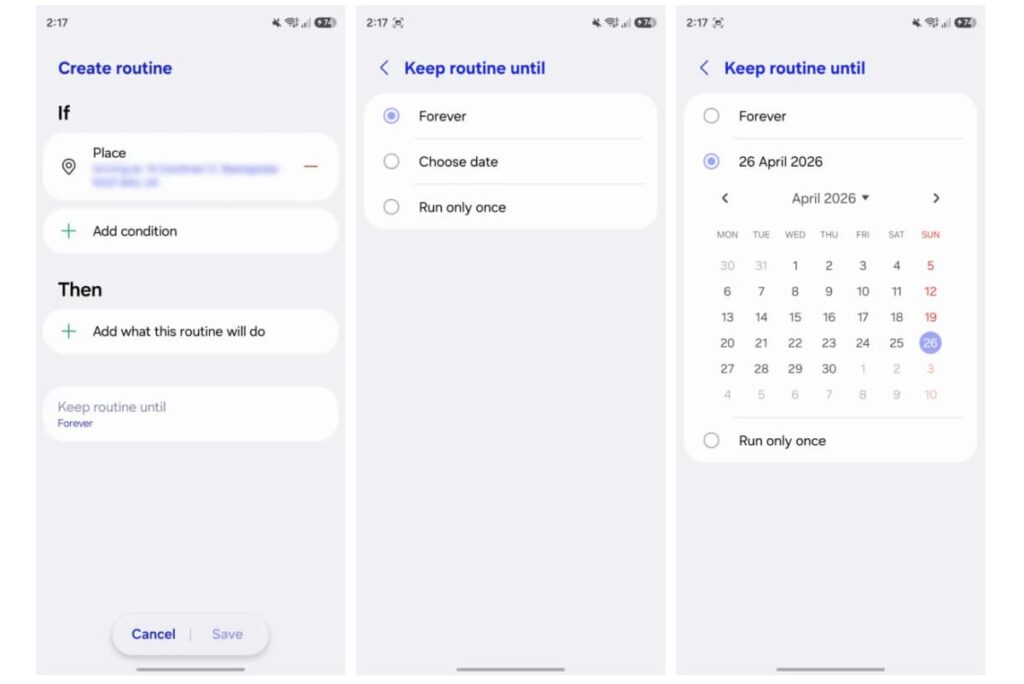
One UI 8.5 fixes this with a new “Keep routine until” field that appears when you’re building or editing a routine. Tap it and you get three options: Forever, Choose date, and Run only once.
Forever is the default, so nothing changes for existing routines; they keep working exactly as before. Choose date does what it sounds like: you pick a specific date and the routine automatically turns itself off when that date arrives. Planning a vacation routine? Set it to expire the day you get back. Running a sleep schedule tweak for a work conference next week? Done. No cleanup required. Running only once is even simpler; the routine fires a single time and then deactivates itself. Perfect for one-off situations like changing your phone settings the night before an early morning flight or setting a reminder action for a specific event.
The one exception is routines that use the “Start manually” trigger that still need to be managed by hand, which makes sense given they’re already intentional one-tap actions rather than automated responses.
On top of the scheduling changes, One UI 8.5 also brings two new routine actions called “Ask Gemini” and “Ask Bixby,” letting you send queries directly to either AI assistant as part of an automated routine. Ask Bixby goes a step further with suggested follow-up actions like placing calls or controlling smart home lights. It’s a small addition, but it starts to blur the line between simple automation and something closer to an AI-driven assistant workflow.
For context, this is still a mid-cycle update One UI 8.5 is based on Android 16 and sits between the bigger One UI 8 and the upcoming One UI 9 on Android 17. But Samsung has packed enough into it that it doesn’t feel like a minor patch. The Routines update alone is the kind of quality-of-life fix that makes a real difference in daily use. Apple’s Shortcuts app on iOS has offered time-based automation control for a while now, and Google’s Pixel’s automation tools have had similar flexibility so Samsung was arguably behind on this specific feature. One UI 8.5 closes that gap in a clean, no-fuss way.
The feature is confirmed working on the Galaxy S26 series running stable One UI 8.5, and has also been spotted on Galaxy S25 devices enrolled in the One UI 8.5 beta. Broader rollout to older Galaxy devices is expected as the update makes its way down the lineup.
If you’ve avoided Samsung Routines because the cleanup felt like more work than it was worth, this update is a good reason to give it another look. Set it, schedule it, forget about it. That’s how automation is supposed to work.
Discover more from Phoonomo
Subscribe to get the latest posts sent to your email.