Apple often highlights the major upgrades when it launches a new iPhone. Sleek design, a powerful chip, and better cameras are the headline makers. But the real charm of the iPhone 15 Pro Max lies in the smaller, less obvious features that quietly make your daily use smoother, faster, and more personal. These hidden gems are not always talked about, yet they bring out the best of the device.
The Action Button: More Than Just a Switch
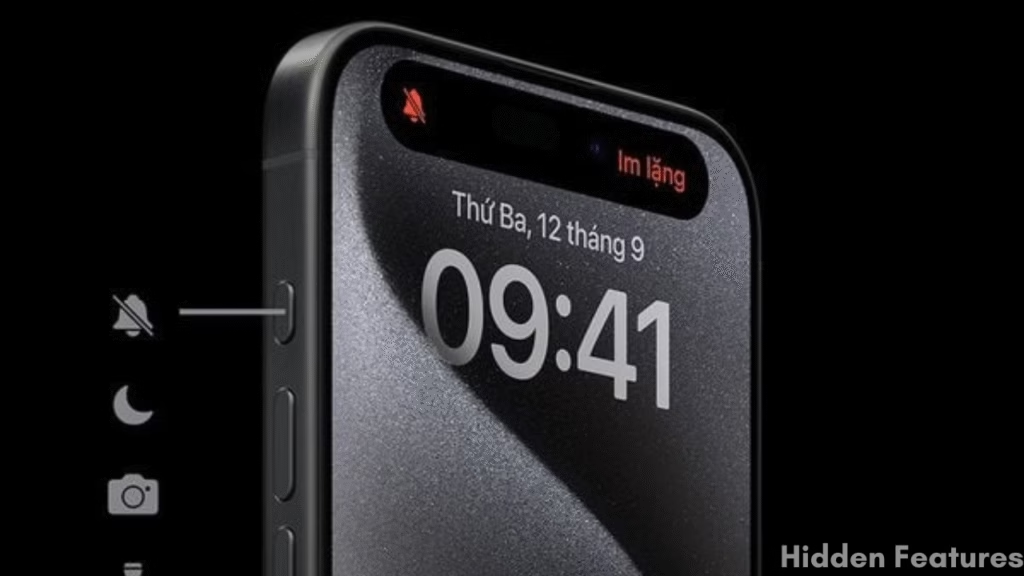
One of the most noticeable changes Apple made with this model is the introduction of the Action button. At first glance, it looks like a replacement for the old mute switch, but it does far more.
With a simple press, you can set it to silence your phone, but if you dig deeper in settings, the button can become a shortcut for a range of tasks. Launching the camera, recording a voice memo, starting a Focus mode, or even opening your favorite app all of these can be tied to it. For those who rely on speed and efficiency, the Action button saves you from swiping through screens or digging into menus.
And with updates in iOS, the button has become even smarter. For instance, it can now directly trigger Visual Intelligence, giving you information about objects or places by just pointing your camera.
Visual Intelligence: A Camera That Knows More
Apple has steadily improved the iPhone camera over the years, but this new feature adds a different layer. Visual Intelligence uses advanced recognition to identify what your camera sees. Maybe you’re pointing it at a landmark, a flower, or a piece of art. In seconds, the phone provides details right on your screen.
This tool is especially handy when traveling or exploring new places. Instead of searching manually, you can let your phone act like a guide in your pocket. It’s tucked inside the system, so many users don’t realize it’s already available through the Action button or Control Center.
Keeping Apps Private with Hidden Folders
Privacy is something Apple takes seriously, and the iPhone 15 Pro Max has a quiet but useful trick for it. Alongside the visible features, iOS now allows you to lock away certain apps in a hidden folder.
If you don’t want specific apps appearing on your home screen, you can move them into this section. Once stored, these apps won’t show up in search, notifications, or suggestions. To open them, Face ID, Touch ID, or a passcode is required.
It’s a simple feature, but powerful for people who share their phone often or just want an extra layer of privacy for banking, messaging, or other sensitive apps.
Pro-Level Photography with a Small Shortcut
For those who love mobile photography, there’s another neat feature inside the Camera app. By holding down the button for RAW Max, you can quickly switch between HEIF Max and ProRAW Max. Both modes capture images at the full 48MP resolution, but the difference lies in flexibility and file size.
- HEIF Max keeps the images sharp while compressing them into smaller files, perfect for everyday use and quick sharing.
- ProRAW Max, on the other hand, gives photographers maximum editing freedom with larger files that preserve detail.
Instead of digging through multiple menus to change this setting, the shortcut makes the switch almost instant. This hidden touch shows Apple’s thoughtfulness for both casual and professional users.
Background Sounds: More Than an Accessibility Tool
Tucked away in the accessibility section is a feature many overlook: Background Sounds. On the surface, it was designed to help people with focus or sensory needs. But in practice, it’s useful for anyone.
From calming rain to gentle streams or neutral dark noise, the sounds can play quietly in the background while you work, read, or sleep. Unlike a separate app or playlist, it’s built right into the system, easy to toggle from the Control Center or through a shortcut on the side button.
This turns the phone into a relaxation tool, helping you wind down or concentrate better without extra apps cluttering your screen.
Quick Feature Table: iPhone 15 Pro Max Hidden Features
| Action Button | |
|---|---|
| Function | Customizable button for camera, voice memos, Focus modes, and shortcuts. |
| Unique Use | Launch apps or trigger automation instantly. |
| Visual Intelligence | |
|---|---|
| Feature | Recognizes objects, landmarks, and text through camera or photos. |
| Use Case | Provides instant information without separate searching. |
| Privacy Features | |
|---|---|
| App Lock | Lock sensitive apps with Face ID, Touch ID, or passcode. |
| Hidden Folder | Moves apps to hidden folder inaccessible from search or notifications. |
| Camera Enhancements | |
|---|---|
| HEIF Max | High-quality photos with smaller file size. |
| ProRAW Max | 48MP RAW photos for professional editing. |
| Spatial Video | Capture immersive 3D videos, viewable on Apple Vision Pro. |
| Audio & Accessibility | |
|---|---|
| Background Sounds | Plays calming audio like rain, ocean, or stream for focus and relaxation. |
| Keyboard Haptics | Provides vibration feedback while typing. |
| Smart Assistance | |
|---|---|
| Siri Offline | Runs basic commands without internet connection. |
| FaceTime Gestures | Trigger effects like balloons or hearts with hand movements. |
| Safari Profiles | |
|---|---|
| Feature | Separate work and personal browsing sessions. |
| Benefit | Keeps extensions, cookies, and history organized and private. |
Disclaimer: We can not guarantee that the information on this page is 100% correct.
Why These Features Matter
What makes these features stand out is how they integrate seamlessly into daily life. The Action button reduces the time it takes to get things done. Visual Intelligence turns your camera into a pocket guide. Hidden apps offer peace of mind for privacy. Camera shortcuts give photographers creative control. Background sounds enhance focus and calm.
None of these may grab headlines like a new chip or display, but together they create an experience that feels smarter and more personal. They’re reminders that Apple’s real strength often lies not just in big innovations, but in subtle touches that change how you use your phone day to day.
Exploring the iPhone Beyond the Obvious
The iPhone 15 Pro Max proves that true value isn’t always in the specs list you see at launch events. Many of these hidden features stay unnoticed unless you take the time to explore them. Once you do, the device feels more tailored to your needs, whether that’s capturing better photos, staying private, or focusing more easily.
Apple’s approach here is subtle; it doesn’t push these tools aggressively. Instead, it leaves them for curious users to uncover. And once discovered, they quietly become part of your routine.
Final Thoughts
The iPhone 15 Pro Max is more than just its titanium frame or the powerful A17 Pro chip. Beneath the headline features lies a collection of smaller, hidden tools that improve convenience, privacy, and creativity. Exploring these tricks can completely change how you experience the phone.
If you’ve just upgraded, it’s worth spending time in settings and experimenting with what’s new. Chances are, some of these hidden features will surprise you and make your iPhone feel fresh all over again.
FAQs
What is the Action button on iPhone 15 Pro Max used for?
The Action button replaces the mute switch and can be customized to launch apps, start Focus modes, open the camera, or trigger shortcuts.
How does Visual Intelligence work?
It identifies objects, landmarks, and text seen through the camera, giving you instant details without needing separate searches.
Can I hide apps on iPhone 15 Pro Max?
Yes. Apps can be placed in a hidden folder that requires Face ID, Touch ID, or a passcode to access, keeping them private and secure.
What is the difference between HEIF Max and ProRAW Max photos?
HEIF Max offers high-quality images with smaller file sizes, while ProRAW Max captures larger files with more detail for advanced editing.
Is Background Sounds only for accessibility?
No. While designed for accessibility, Background Sounds can help anyone relax, sleep better, or stay focused with calming audio.
Discover more from Phoonomo
Subscribe to get the latest posts sent to your email.