

All right, let’s get straight into it. After covering several Honor flagships over the years, we finally have the new Honor Magic 8 Pro on the table, and this one comes with a few important upgrades that focus mainly on photography. Instead of throwing a long list of specs at you, this review breaks everything down into the three main improvements that Honor has made this year. These upgrades may look simple on paper, but they actually make a big difference when you start using the phone.
Before diving into those three parts, let’s take a quick look at the rear camera setup. At the back, you get a triple-camera arrangement: a 50-megapixel main sensor, a 200-megapixel telephoto, and a 50-megapixel ultra-wide. On the surface, this may look similar to what most flagships offer today, but Honor has added new image engines to handle night scenes, stabilization, and portraits. That extra work in software is where the real improvements start showing.
Stronger Stabilization for Everyday Shooting
The first major highlight this year is stabilization. Both the main camera and the telephoto lens come with CIPA 5.5-rated stabilization. This is a big jump because stabilization at this level is usually found on more advanced cameras, not smartphones.
If your hands shake a little when taking photos, or if you struggle to keep the phone steady at long zoom levels, this feature will help you out more than you expect. For example, zooming in to 100x on most phones creates a lot of wobble. The picture jumps around, and getting a sharp shot becomes a challenge. On this phone, the stabilization keeps everything surprisingly steady, even if you’re holding the phone with just one hand. It makes taking long-zoom photos a lot less stressful.
Stabilization also helps at night. When the lighting is low, cameras usually need a longer exposure to capture enough detail. During that time, even tiny movements can blur the photo. With stronger stabilization, you can take a shot in a dim environment or even inside a moving car, and the results remain sharp. This also applies when zooming at night, which is something most phones struggle with. Whether you’re taking photos of tall buildings or city lights, the stability really helps.
If you want even more help, the AI Enhance option kicks in once you move past 10x zoom. The phone uses software to clean up the shot and make sure the final image looks as clear as possible.
So as a whole, stabilization on this device feels like a big upgrade. Whether you’re shooting during the day, zooming far into a scene, recording videos, or taking photos at night, the images turn out much sharper than last year’s model.
Improved Portraits
The second major change is in portrait photography. On older Honor phones, some users felt that portraits looked a bit too processed or overly edited. The brand clearly listened this time, because portraits now look much more natural.
Instead of scrolling through different focal lengths like 1x, 2x, 3x, and so on, Honor has put together five presets that work well for portraits. You can choose any of them without worrying about which distance gives the best effect. These presets make it easier to find the right angle whether you want a close-up face shot, a shoulder-level frame, or a portrait that captures more of the background.
Skin tones look better now too. Some phones automatically change your face slightly when portrait mode is turned on—you might not notice it at first, but after a while you can tell something feels off. That problem isn’t here. The photos look more true to life, and edges around the subject are well-defined without the artificial blur effect that older phones used to create.
Overall, it feels like Honor simplified the process while also improving the output. You don’t need to adjust ten settings to get a good portrait. You just enter portrait mode, choose one of the presets, and the phone does the rest.
AI With Custom Filters
The third big upgrade is Honor’s use of AI. Instead of partnering with big camera brands like some competitors do, Honor created something unique. They added “AI Image” tools that let you copy color styles from any picture you like and apply it directly inside the camera.
Let’s say you see a photo on Instagram or a mood shot on social media. You like the color style, the tones, or the vibe. On this phone, you can save that picture, open the camera app, swipe to the filter section, tap the AI option, and allow the phone to extract the color style. Then, you can take photos with that same tone applied automatically. It isn’t a perfect one-to-one copy, but it’s close enough to give your shots a unique look.
If you prefer classic film vibes, the built-in filters also resemble well-known film simulations. Names like Classic Negative, Clear Negative, Warm Negative, and Rich Negative might ring a bell if you’ve used film-style cameras before. These give you a nice range of styles depending on the mood of your shot.
Even after taking the photo, you can still use the AI filters in the gallery. This helps when you want to edit older photos with the same tones you captured from another image.
Aside from color tools, the phone also comes with several AI-powered features you may already be familiar with: an AI eraser that removes people from the background, upscaling, out-painting, cutouts, and face correction. The AI eraser works especially well when you’re in crowded places. With a single tap, people walking behind you can disappear from the shot, making the photo cleaner.
The New AI Button
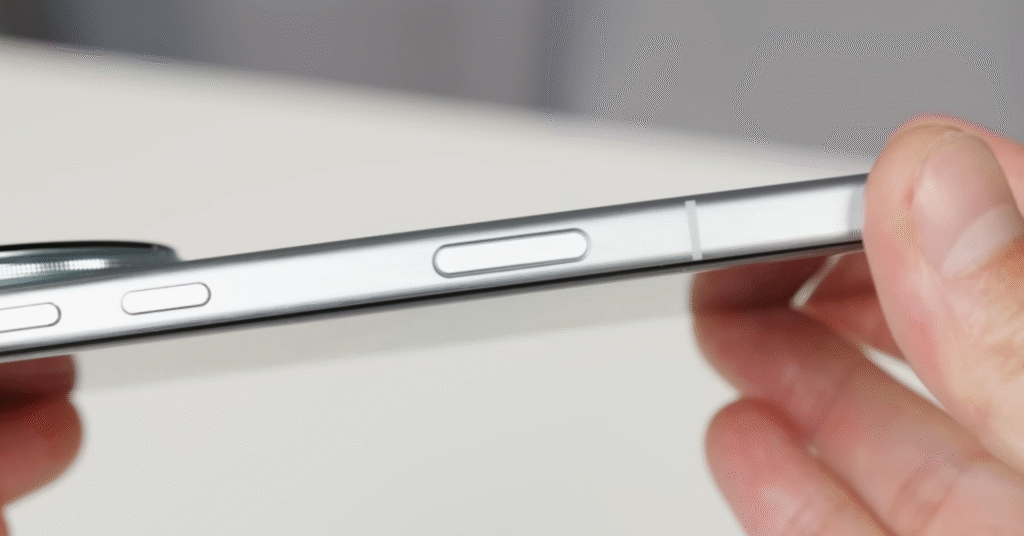
Another small but useful upgrade is the new AI button. This button can be customized for different shortcuts. You can assign actions for a short press, double press, or long press. For example, you can set it to open Google Lens instantly for quick searches.
When you’re in the camera app, the AI button becomes a shutter button. Press it fully to take a picture, or slide your finger on it to zoom in and out. It feels a lot more convenient than tapping on the screen, especially when using one hand.
New Watermark Styles
Honor also added new watermark designs this year. Older models had very limited options, but now you’ll find many different styles that adapt to the kind of photo you’ve taken. Some look professional, while others are more playful. If you enjoy sharing photos with aesthetic watermarks, you’ll likely appreciate the new selection.
Final Thoughts (Honor Magic 8 Pro)
After going through all these new features, it’s clear that the honor magic 8 pro focuses heavily on improving photography. You get stronger stabilization, cleaner and more natural portraits, and a smarter use of AI for filters and creative edits. These upgrades make the phone feel more polished, especially for people who enjoy shooting photos casually or even semi-professionally.
It keeps the strong hardware Honor is known for, but now adds smarter software tools that support your day-to-day shooting habits. Whether you take pictures during travel, capture portraits of friends, or create stylized photos for social media, the phone gives you a lot of easy-to-use tools that actually make a difference.
That wraps up the review. If you need help with presets or want advice on improving your photos, feel free to ask anytime.
Read Also HONOR Power 2 Could Debut 10,000 mAh Battery Innovation
Discover more from Phoonomo
Subscribe to get the latest posts sent to your email.


