Smart Replies have been both a blessing and a curse in messaging apps. Quick, AI-generated suggestions can save time but we’ve all accidentally sent a one-word reply like “Sure” or “OK” when we didn’t mean to. Google is finally addressing that frustration with its latest Google Messages update: ‘Tap to Draft.’
The feature changes the way Smart Replies work. Instead of sending a suggested reply immediately when you tap it, Tap to Draft inserts the text into the message box, letting you review, edit, or expand it before hitting send. It’s a subtle tweak, but one that gives users more control and prevents those awkward accidental replies.
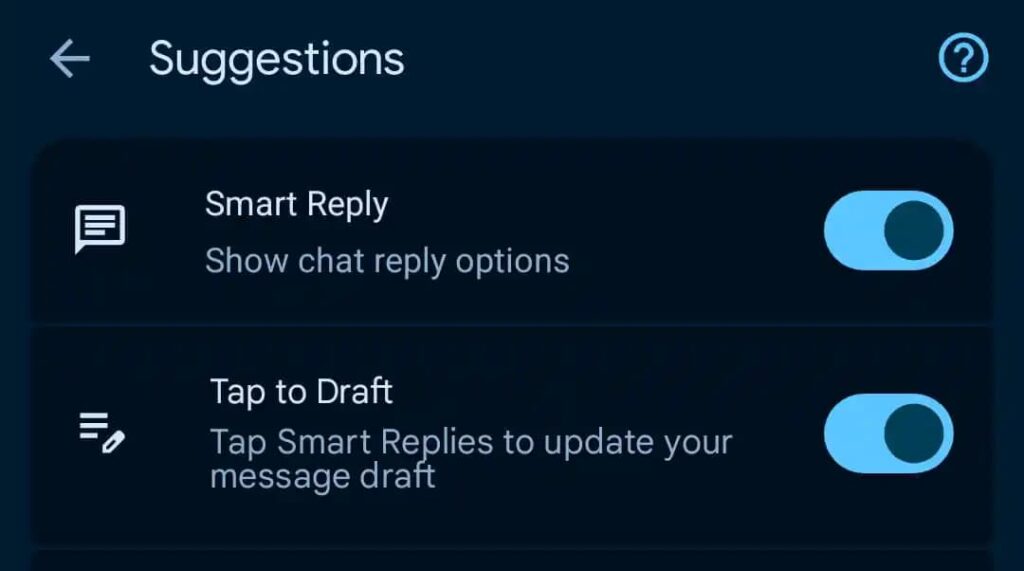
Currently rolling out in the beta version, this option will live in Settings → Suggestions, letting users switch between the old Tap to Send behavior and the new Tap to Draft mode. While it doesn’t alter how AI generates the suggested replies, it changes how we interact with them, a thoughtful improvement for anyone who’s ever regretted a quick tap.
The reaction from early adopters has been positive, especially from those who find Smart Replies helpful but sometimes intrusive. By introducing a middle step, Google balances speed and control, which is exactly what users need from AI-powered messaging features.
The takeaway: ‘Tap to Draft’ won’t reinvent messaging, but it makes Google Messages smarter in a human wayletting AI assist without letting it take over. Once it rolls out broadly, it’s worth flipping the toggle in Settings if you’ve ever sent a reply too quickly. Simple, practical, and exactly the kind of tweak messaging apps should focus on.

M Adnan Akram is the founder and lead writer at Phoonomo, covering mobile technology with a primary focus on Samsung and the broader smartphone industry, alongside emerging developments in AI. He follows product launches, spec leaks, and industry trends closely to keep readers informed with timely updates.
Discover more from Phoonomo
Subscribe to get the latest posts sent to your email.